Untangle 3D









Untangle 3D: Brain-Training Puzzle Game to Sharpen Your Logic Skills
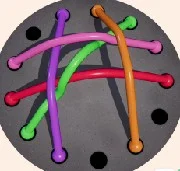
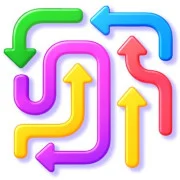
Untangle 3D is a logic puzzle game where players untangle colored cords on a board by moving their ends into empty holes until no lines cross. It’s a simple idea that gets tricky fast, and it works right in your browser on any device.
The rules take seconds to learn. Each level shows a board full of tangled cords in different colors. Drag the end of a cord to a vacant hole, and it locks in place. Clear every crossing and the level is done. The physics feel satisfying—cords stretch and snap into position in a way that makes fiddling with them oddly calming.
Levels and Daily Challenges
The game includes 50 levels spread across 5 chapters. Early puzzles are easy enough for kids, while later chapters demand real spatial thinking. There’s also a Daily Level, so a fresh challenge shows up every day even after you’ve cleared the main map.
Solving a level isn’t the whole story. Finish with the minimum number of moves and you earn 3 stars. That’s where the replay value kicks in. A sloppy solution counts, but a clean one feels better.
Skins, Coins, and Rewards
Coins earned from playing can be spent in the Skin Shop, which holds 14 themes to change the look of the board. Logging in daily brings achievements and rewards, and login streaks unlock exclusive skins you can’t buy. And if a puzzle has you completely stuck, the “Remove Cord” bonus lets you delete one cord and breathe again.
Why It’s Worth Playing
Untangle 3D trains concentration and spatial reasoning without feeling like homework. It’s the kind of puzzle game you open for five minutes and close twenty minutes later. Short levels make it easy to squeeze in between classes or on a commute.
Game Controls
- PC: click and hold the left mouse button on a cord end, drag it to an empty hole, then release.
- Mobile/tablet: touch and drag a cord end with your finger.
- Remove Cord: activate the bonus, then tap a cord to delete it.
- Map: pick a level and chapter.
- Daily Level: open the daily challenge.
- Shop: spend coins on skins.
- Music note icon: toggle the music.
- Circular arrow: restart the level.
As always, remember to have fun!